How to start contributing?
This documentation provides detail on how to contribute to EDITO services, processes, data and metadata.
The following figure provides some hints to understand how to give value to your first work on EDITO, by contributing either to the service layer, the process layer or the data layer. 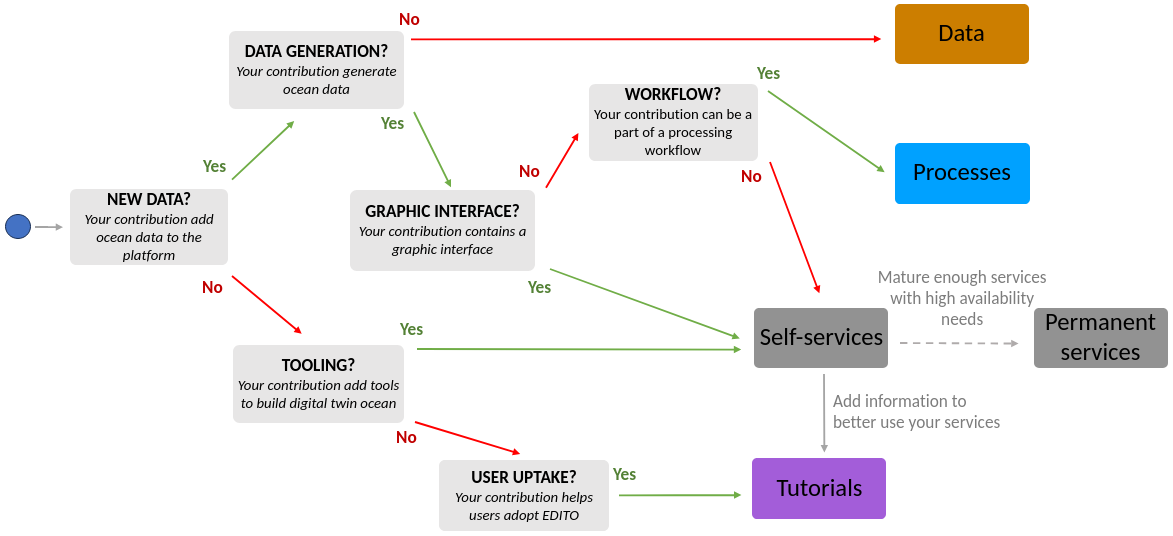
Once you started to contribute to each layer independently, you are encouraged to exploit all EDITO layers to architect your contribution.
How to architect you work?
Both service and processes types run on internal EDITO computing cluster. However, using containers, they can rely on external resources (data, storage, computational resources) that should be hidden to end-user for simplicity. Moreover, enabling seamless direct run on external infrastructures is foreseen and currently evaluated.
The separation between services and processes is there for both your architectural need and for the reusability of your work.
For example, you could build an end-user application that launches your underlying processes with specific inputs, and then allows the end-user to explore the output data within the application.
Moreover, nothing prevents one process to launch others sub-processes in background.
In addition, be aware that you can “hide” several containers under a single service (hence, a single tile in the catalog UI). In doing so, end-users have a single point of entry to launch and access your service even if, under the hood, your service relies on a database for example.
Tutorials
Finally, you can also take advantage of the tutorial engine to create and host description/documentation pages, and to provide a “Launch” button to directly launch your service with a particular configuration.
Getting started
The service and process deployments rely on helm chart repositories versioned using Gitlab. To get write access to public contributing repositories on Mercator Ocean Gitlab instance and/or be added to the support channel on Microsoft Teams, please contact the support.
Check-out the following tutorials: