Secret management
Environment variables
Sometimes, certain pieces of information need to be made available to a large number of applications, or they should not be directly embedded in your code (access tokens, passwords, etc.). The use of environment variables allows accessing this information from any service or process.
When a service or a process is launched, several environment variables are automatically injected, such as access tokens for GitHub and MinIO.
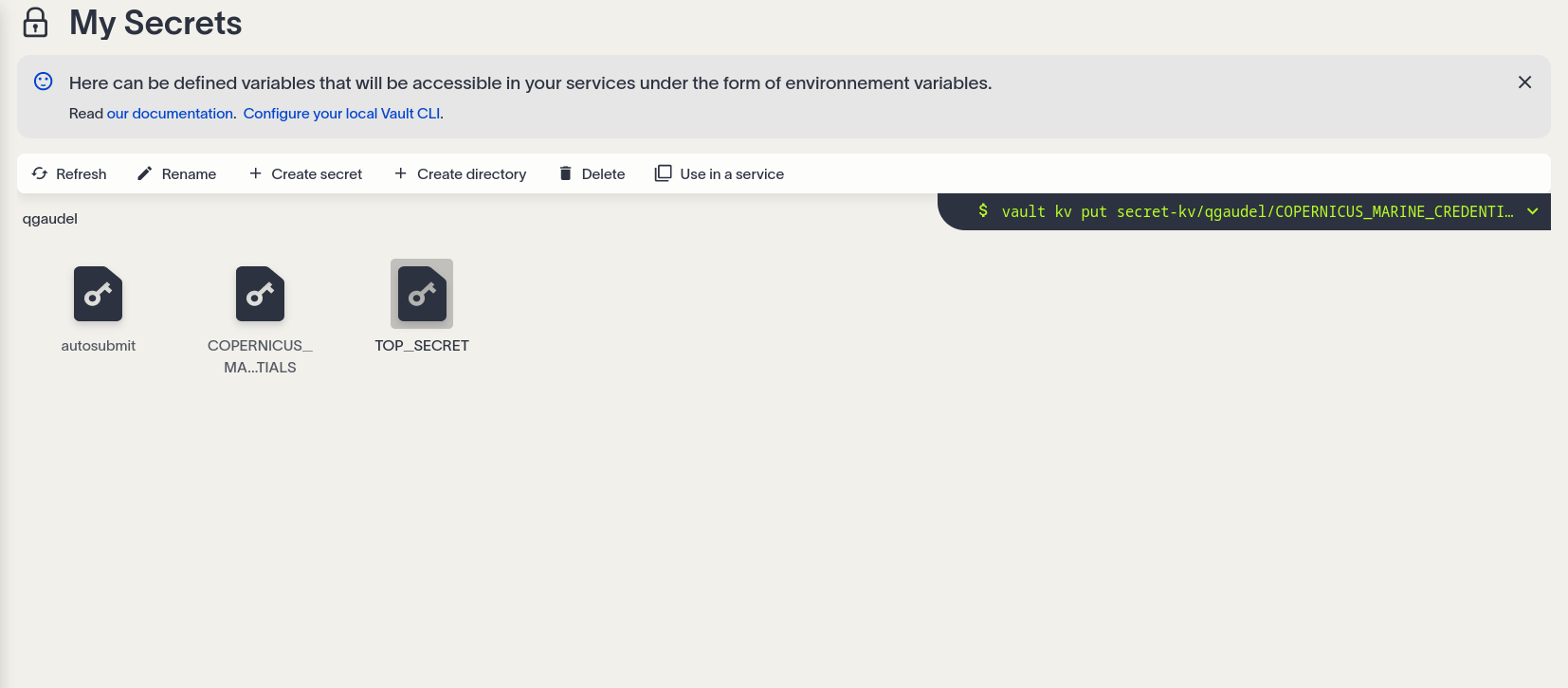
Creation and management of secrets
On the platform, environment variables are treated as secrets stored in Vault (the EDITO secret management component) and are encrypted. This enables you to store tokens, credentials, and passwords securely. The My secrets page is designed like a file explorer, allowing you to sort and organize your variables into folders.
Getting started
- Create a new folder with
+ New folder. - Then, within this folder, create a new secret with
+ New secret. - Open your secret.

Each secret can contain multiple variables, consisting of key-value pairs.
+ Add a variable
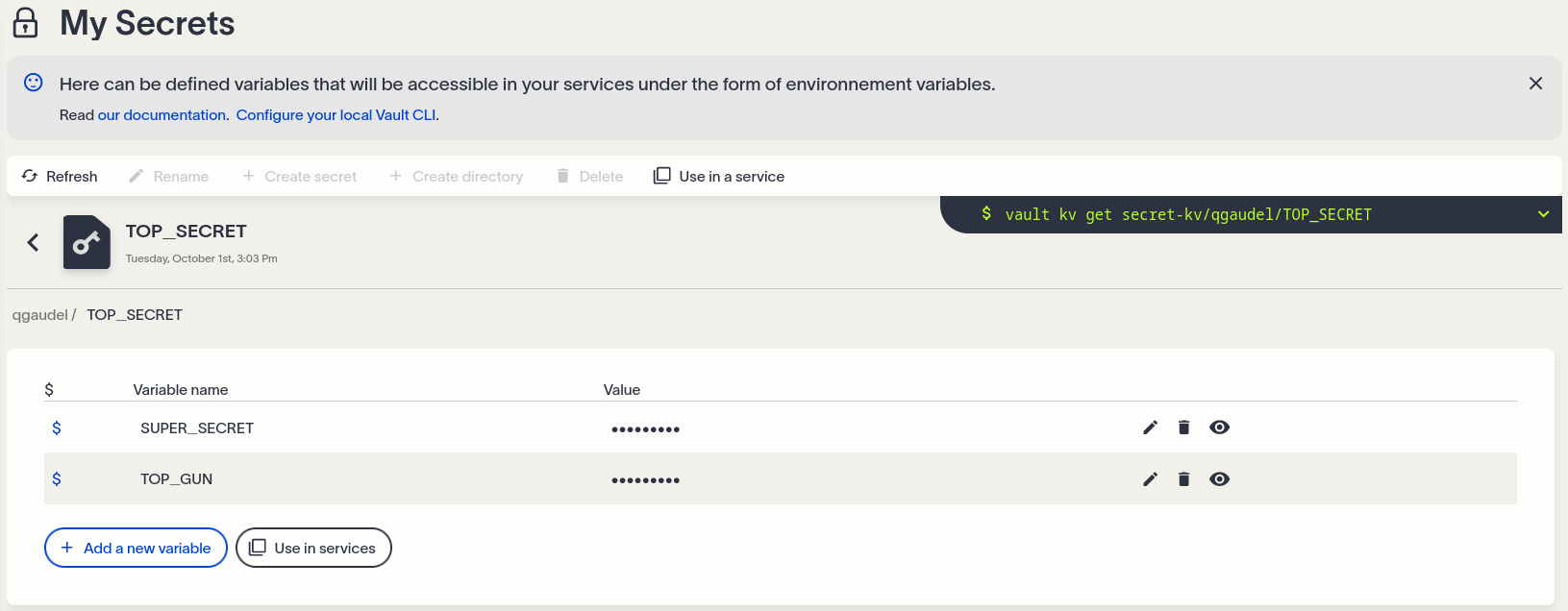
The keys (variable names) always begin with
$and contain only letters, numbers, and the underscore character (_). By convention, keys are written in UPPERCASE.
Fill in the name of the key and its value.
Converting secrets into environment variables
Once your secret is edited, along with its different variables, you are ready to use it in your service or process. Let’s try it in a service:
- Copy the secret’s path by clicking on the
Use in a servicebutton. - Then, during the configuration of your service, go to the
Vaulttab (if the service support Vault integration) and paste the secret’s path in the dedicated field.
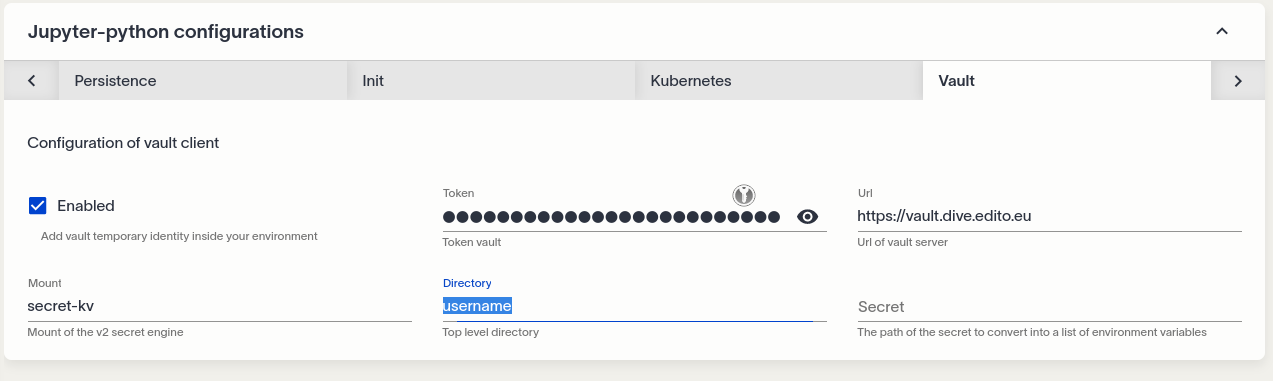
- Create and open your service
In services based on Juperlab, Rstudio and VSCode, you can verify that your environment variables have been successfully created by running the following commands in the service terminal:
# List all available environment variables
env

# Display the value of an environment variable
echo $MY_VARIABLE

# Find all environment variables containing a given pattern
env | grep -i "<PATTERN>"
Access your secrets
With official Vault CLI (recommanded)
From within a service or process running on EDITO
The Vault integratation is set for almost all services and processes. You can thus dig in the official Vault documentation or just inspire yourself from the code snippets that are display in the My secrets page and update according to what you are doing manually with the UI. For example, to access a secret your can run:
vault kv get secret-kv/<PROJECT_NAME>/<YOUR_SECRET_NAME>From outside EDITO
You can follow these instructions to access your secrets locally on your laptop or other external resources.
In Python
Here are examples of how to interact with Vault using the hvac Python client.
Read a secret
To read a secret from Vault:
import hvac
client = hvac.Client(
    url='https://vault.dive.edito.eu',
    token='<YOUR_VAULT_TOKEN>'
)

read_secret_result = client.secrets.kv.v1.read_secret(
    path='data/<PROJECT_NAME>/<YOUR_SECRET_NAME>',
    mount_point='secret-kv'
)
print(read_secret_result['data'])
List secrets
To list the keys under a specific path:
import hvac
client = hvac.Client(
    url='https://vault.dive.edito.eu',
    token='<YOUR_VAULT_TOKEN>'
)

list_secrets_result = client.secrets.kv.v1.list_secrets(
    path='data/<PROJECT_NAME>'
    mount_point='secret-kv'
)
print('The following keys found under the selected path: {keys}'.format(
    keys=','.join(list_secrets_result['data']['keys']),
))
Create or update a secret
To create or update a secret:
import hvac
client = hvac.Client(
    url='https://vault.dive.edito.eu',
    token='<YOUR_VAULT_TOKEN>'
)

# Define the secret
secret = {
    'psst': 'this is so secret yall',
}

# Store the secret at the specified path
client.secrets.kv.v1.create_or_update_secret(
    path='data/<PROJECT_NAME>/<YOUR_SECRET_NAME>',
    mount_point='secret-kv',
    secret=secret
)

# Verify by reading the secret back
read_secret_result = client.secrets.kv.v1.read_secret(
    path='data/<PROJECT_NAME>/<YOUR_SECRET_NAME>',
    mount_point='secret-kv'
)
print('The "psst" secret is: {psst}'.format(
    psst=read_secret_result['data']['psst'],
))
Delete a secret
To delete a secret from Vault:
import hvac
client = hvac.Client(
    url='https://vault.dive.edito.eu',
    token='<YOUR_VAULT_TOKEN>'
)


# Delete the secret at the specified path
client.secrets.kv.v1.delete_secret(
    path='data/<PROJECT_NAME>/<YOUR_SECRET_NAME>',
    mount_point='secret-kv'
)

# The following will raise a :py:class:`hvac.exceptions.InvalidPath` exception as the secret has been deleted.
read_secret_result = client.secrets.kv.v1.read_secret(
    path='data/<PROJECT_NAME>/<YOUR_SECRET_NAME>',
    mount_point='secret-kv'
)