Interact with the Data API
This API aims to programmatically interact with EDITO data lake: data, metadata and assets. The EDITO data lake is composed of a data storage and a data catalog. This guide provides instructions and example to interact with both of them.
EDITO data storage API
Learn more about EDITO storage here. Your personal storage is managed by you, group storage by the group members, using the MinIO API. For example, you can give anonymous access to some asset stored in your personal storage and reference it within the EDITO data catalog.
EDITO data catalog API
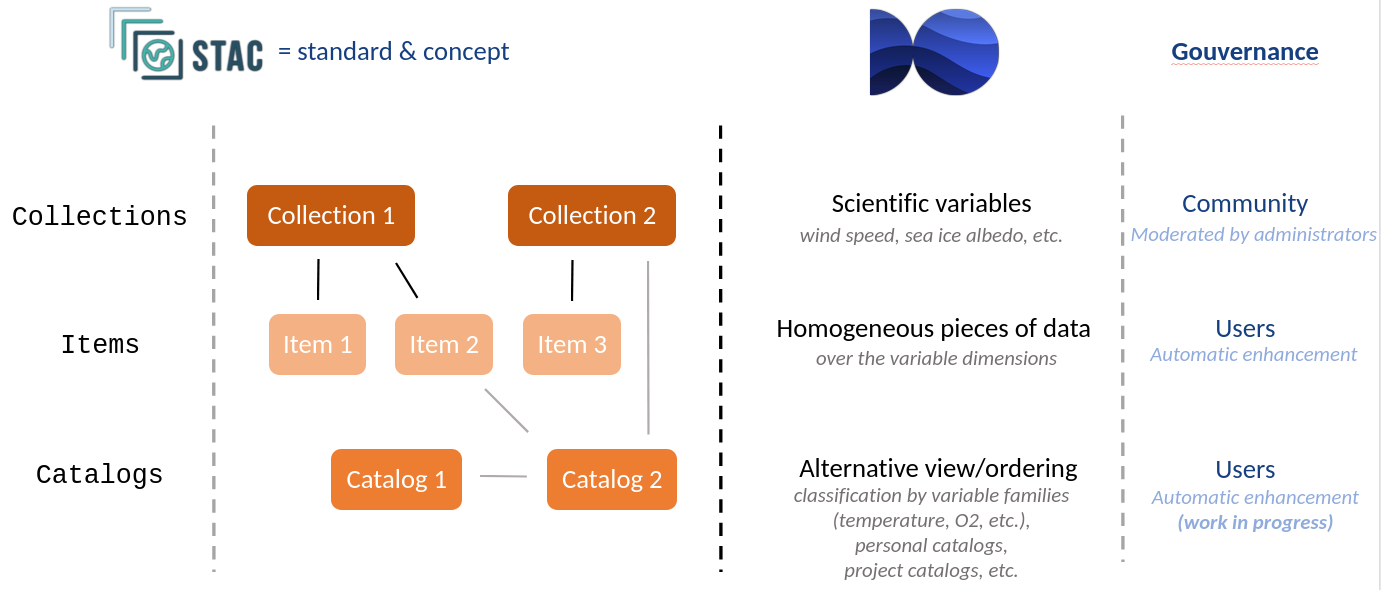
The EDITO data catalog API is compliant with the SpatioTemporal Asset Catalog (STAC), STAC API and OGC API Features standards. Morever, EDITO data catalog organisation is also aligned with STAC concept and best practices. Especially, we use:
- STAC Collections to classify data by scientific variables (wind speed, sea ice albedo, etc.). This is the objective classification of any data. Each collection represents a specific variable defined by a specific convention standard name definition. The collections are governed by the community, but moderated by the administrators.
- STAC Items to represent homogeneous pieces of data (over the variable dimensions). Items are added and governed by the users. An item is necessarily inserted into a collection and refers to the scientific variable of the collection it belongs. Some item metadata are automatically generated to ease integration with other sub-system of EDITO or external systems.
- STAC Catalogs to classify data by alternative view or ordering (classification by variable families, such as “temperature”, “O2”, etc., personal catalogs, project catalogs). This is the subjective classification of any data. Catalogs are added and governed by the users. Some catalog metadata are automatically generated to ease integration with other sub-system of EDITO or external systems.
The base URL to interact with the data catalog is https://api.dive.edito.eu/data. Each endpoint described here should be prefixed by this URL.
Collections
A STAC collection is a way to organize and describe a group of geospatial data. It tells you what the data covers (location and time), what it’s about (details like resolution or format), and where to find it (links to the data files). It helps make the data easy to find and use. In EDITO, a collection typically represents a scientific variable from the CF convention or from the EMODnet convention.
For instance, the climate_forecast-sea_water_potential_temperature collection contains all forecast products for sea water temperature organized by time.
GET collections
In order to retrieve all available collections the endpoint /collections returns the list of EDITO collections.
Example:
curl "https://api.dive.edito.eu/data/collections"Note: Considering the relatively high number of collections, only non empty collection are returned from this request (non empty means collection with at least on item).
GET collection by ID
The endpoint /collections/{collectionId} permits to have more information on a specific collection.
Example:
curl "https://api.dive.edito.eu/data/collections/climate_forecast-sea_water_potential_temperature"Items
A STAC item is a description of one piece of geospatial data. It includes details about its spatiotemporal extent (location and time), what it’s about from a set of standardized metadata, and links to download or view the corresponding data. An item must belongs to one and only one collection.
For instance, an item from the climate_forecast-sea_water_potential_temperature collection would be the Sea water temperature from Wed Oct 23 2024 00:00:00 GMT+0000 (Coordinated Universal Time) to Fri Nov 22 2024 07:30:00 GMT+0000 product
Note on item vs feature: In the API documentation you could find reference to “item” and “feature”. This is the same thing. The naming “item” comes from the STAC API while the “feature” naming comes from the OGC API Feature.
GET items in a collection
The endpoint /collections/{collectionId}/items returns items belonging to the collection collectionId.
Example:
curl "https://api.dive.edito.eu/data/collections/climate_forecast-sea_water_potential_temperature/items"The returned items are wrapped in an ItemCollection (which is a valid GeoJSON FeatureCollection that contains STAC Item objects). To avoid huge response, the result is paginated. Subsequents pages can be retrieve using the "rel":"next" link from the ItemCollection links property.
GET items in a collection by ID
The endpoint /collections/{collectionId}/items/{itemId} returns a specific item.
Example:
curl "https://api.dive.edito.eu/data/collections/climate_forecast-sea_water_potential_temperature/items/2f783bc6-a565-53c5-a5ff-ea5fdc4df2b1"POST to create a metadata item/feature within a collection
This endpoint is authenticated and require a bearer token in the header of the request.
You can learn more about those tokens in the Get tokens and access tokens article. Note that you need to set the client_id to edito.
Now you can create an item compliant with STAC.
Here is a minimal example of creation of metadata related to sea water temperature data assets:
curl 'https://api.dive.edito.eu/data/collections/climate_forecast-sea_water_temperature/items' \
     -X POST \
     -H 'Accept: application/json' \
     -H "Content-Type: application/json" \
     -H "Authorization: Bearer <YOUR_ACCESS_TOKEN>" \
     --data '{
         "id": "TestFeature",
         "type": "Feature",
         "properties": {
             "datetime": "2023-01-12T09:01:00Z"
         },
         "geometry": {
             "coordinates": [[[0,0],[0,0],[0,0]]],
             "type": "Polygon"
         },
         "assets": {
             "data": {
                 "href": "<URL_TO_YOUR_DATA>",
                 "title": "data",
                 "roles": ["data"],
             }
     }'
STAC-extensions support
Extension conformance
STAC-extension exposure is automatic: if you include in your item at least one field of a specific extension, this extension’s schema will be automatically added in the item stac_extensions list field.
Automatic example generation
If an item was defined without a Python example, but the asset list contains an URL to a NetCDF or Zarr files, then an example to open the dataset with Xarray is automatically generated:
import xarray

dataset = xarray.open_dataset(<LINK_TO_ASSET>, engine=...)
print(dataset)
If you need automatic example generation over more formats, please contact the support.
Automatic integration with EDITO datalab
Depending on an item content, some extra fields are automatically generated to propose relevant integration with EDITO datalab.
Explore assets in EDITO datalab data explorer
For any asset URL pointing to a Zarr, Parquet or CSV file, a link to open the file in EDITO datalab’s data explorer is generated.
If you need data exploration support for more cloud-native formats, please contact the support.
Open examples in EDITO datalab services
For any Jupyter Notebook example, a link to run the example in an EDITO datalab JupyterLab service is generated.
If you need automatic service link generation over more content kinds, please contact the support.
List your items
To list your items, you can use the search endpoint:
curl "https://api.dive.edito.eu/data/search?owner=<YOUR_USERNAME>&limit=250"Catalogs
A STAC catalog is like a directory or folder that organizes geospatial data. It connects collections and items (like datasets and individual files) into a structure using links, helping users explore large amounts of geospatial information in an organized way.
GET a catalog
The catalogs root endpoint is /catalogs
curl "https://api.dive.edito.eu/data/catalogs"From this endpoint, the catalogs tree can be explore by following the "rel":"child" link in the links property as explained in the STAC specification.
Create a catalog
To create a catalog, you should POST a valid json STAC catalog description to /catalogs endpoint.
Here is a minimal example to create a catalog at the catalogs root level:
curl 'https://api.dive.edito.eu/data/catalogs' \
     -X POST \
     -H 'Accept: application/json' \
     -H "Content-Type: application/json" \
     -H "Authorization: Bearer <YOUR_ACCESS_TOKEN>" \
     --data '{
         "id": "MyCatalog",
         "type": "Catalog",
         "description": "This is my first level catalog"
     }'
Add child to a catalog
You cannot create a catalog referencing childs or item in links that does not exist because a child cannot exist before its parent. Thus, the good way to add child to a catalog is to create an empty catalog then add its childs through the POST API.
Here is a minimal example to add a catalog child catalog to MyCatalog. Note that this catalog reference an existing collection as child:
curl 'https://api.dive.edito.eu/data/catalogs/MyCatalog' \
     -X POST \
     -H 'Accept: application/json' \
     -H "Content-Type: application/json" \
     -H "Authorization: Bearer <YOUR_ACCESS_TOKEN>" \
     --data '{
         "id": "MyCatalogChild",
         "type": "Catalog",
         "description": "I am a child of MyCatalog",
         "links":[
            {
                "href": "https://api.dive.edito.eu/data/collections/climate_forecast-sea_water_temperature",
                "rel": "child"
            }
         ]
     }'
Update a catalog
To update a catalog, PUT the json catalog description to the corresponding catalog endpoint. Only user with the “updateCatalog” right can update a catalog he owns
Here is an example to update the description of the catalog MyCatalogChild:
curl 'https://api.dive.edito.eu/data/catalogs/MyCatalog/MyCatalogChild' \
     -X PUT \
     -H 'Accept: application/json' \
     -H "Content-Type: application/json" \
     -H "Authorization: Bearer <YOUR_ACCESS_TOKEN>" \
     --data '{
         "id": "MyCatalogChild",
         "type": "Catalog",
         "description": "I update the catalog by updating its description"
     }'
IMPORTANT: When updating a catalog, if links property is set, then the existing catalog links will be replaced by the input links. To avoid accidental replacement of links, the default behavior is to forbid this by returning an HTTP 400 error. The replacement can be forced by adding a _force=true query parameter to the request.
Here is an example to update the links of the catalog MyCatalogChild. Note the _force=true parameter to force the links update. Thus, the previous links referencing the climate_forecast-sea_water_temperature collection will be discarded and replaced by two links directly pointing to two individual items from this collection:
curl 'https://api.dive.edito.eu/data/catalogs/MyCatalog/MyCatalogChild?_force=true' \
     -X PUT \
     -H 'Accept: application/json' \
     -H "Content-Type: application/json" \
     -H "Authorization: Bearer <YOUR_ACCESS_TOKEN>" \
     --data '{
         "id": "MyCatalogChild",
         "type": "Catalog",
         "description": "Be careful, setting links will replace existing links attached to this catalog !",
         "links":[
            {
                "href": "https://api.dive.edito.eu/data/collections/climate_forecast-sea_water_temperature/710f775e-4bec-5e29-b940-7cf225de1f8e",
                "rel": "item"
            },
            {
                "href": "https://api.dive.edito.eu/data/collections/climate_forecast-sea_water_temperature/8eaad80c-2077-5687-a8af-5483a54368ac",
                "rel": "item"
            }
         ]
     }'
Delete a catalog
To delete a catalog, DELETE the corresponding catalog endpoint.
This will return an HTTP error because the catalog contains child and removing it would remove childs:
curl 'https://api.dive.edito.eu/data/catalogs/MyCatalog' \
     -X DELETE \
     -H 'Accept: application/json' \
     -H "Content-Type: application/json" \
     -H "Authorization: Bearer <YOUR_ACCESS_TOKEN>"
     '
The _force=true parameter will force deletion and will remove both the catalog and its childs:
curl 'https://api.dive.edito.eu/data/catalogs/MyCatalog?_force=true' \
     -X DELETE \
     -H 'Accept: application/json' \
     -H "Content-Type: application/json" \
     -H "Authorization: Bearer <YOUR_ACCESS_TOKEN>"
     '
Search
The catalog engine support both STAC API and OGC API feature so you can perform a search on all items using either the /search endpoint or the /collections/{collectionId}/items endpoint.
BBOX search
For instance if you want to search for all items of all collections that intersects the bbox -10,10,-10,10.
curl "https://api.dive.edito.eu/data/search?bbox=-10,10,-10,10"If you want the same query but limited to the climate_forecast-northward_sea_water_velocity collection.
curl "https://api.dive.edito.eu/data/collections/climate_forecast-northward_sea_water_velocity/items?bbox=-10,10,-10,10"Catalog search
To search for a specific catalog from a part of its name or from its description, you can use the /catalogs endpoint with the q parameters. For instance to search for all catalogs containing temperature:
curl "https://api.dive.edito.eu/data/catalogs?q=temperature"Item search from a catalog
The properties/resto:catalogs property within an item provides the list of all catalogs this item belongs to (e.g. dfff7b6b-c6dd-5178-bc30-986c057325d0).
To get all items belonging to a catalog as a JSON FeatureCollection, you can pass the catalog identifier to the /search endpoint using the q parameter (whith / character encoded as %3A). For instance:
curl "https://api.dive.edito.eu/data/search?q=climate_forecast-northward_sea_water_velocity"