EDITO Documentation
Welcome to EDITO!
The Digital Twin of the Ocean (DTO) is a virtual representation of the real ocean, continuously updated with real-world observations, models, data science, and artificial intelligence. It allows users to:
- Visualize and explore ocean knowledge, data, models, and forecasts.
- Interact with the digital twin to run “what if” scenarios, supporting decision-making and highlighting areas needing better observation.
- Improve understanding of the ocean and inform decisions, supporting ocean literacy and research for a wide range of users, including researchers, professionals, educators, and the public.
EDITO and the challenge to build Digital Twin of the Ocean
EDITO provides tool to explore and build the European digital twins of the Ocean. The main challenge is to allow anyone to generate data that have never been generated before. To do so, it focuses on three levels of interaction: the services, the processes and the data. All of them are backed by API and graphical web interfaces, can seamlessly interact internally or easily integrated with external resources.
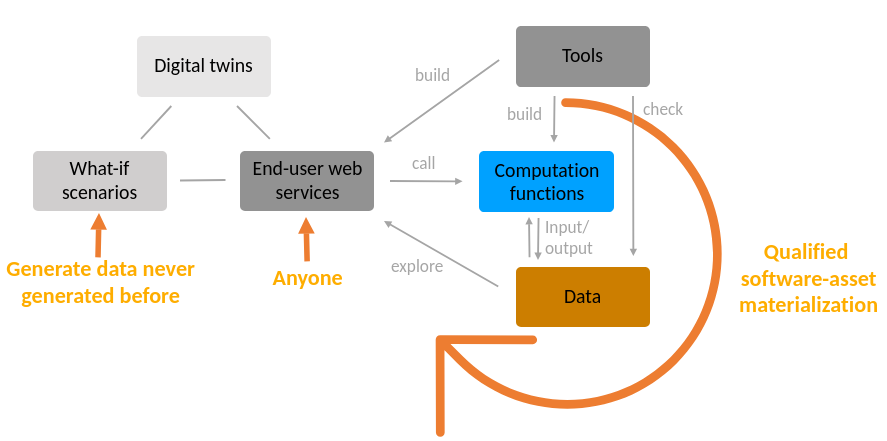
EDITO services, processes and data
Service
A service is an interactive application (serving API and/or a graphical web interface). It can be a data science tool or an end-user application (decision making applications, What-If applications or focus applications) dedicated to anyone or to a specific community of users.
Process
A process is a remote function that generates data, such as data transformation, pre/post-processing, reanalysis, forecasts, detections, What-If scenarios, quality controls. It can be piped, scheduled, or triggered on-demand. Its inputs and output locations can be configured at runtime. In opposite to a service, it is not interactive during execution (it does not host a web server or UI).
Data
Data are both metadata and data assets (the actual data). Metadata can reference data assets hosted in EDITO internal storage or reference data assets hosted in external infrastructures. Metadata can also contain links to processes that generate the data assets. This enables (software-)asset materialization, i.e. the on-demand generation of assets that have been previously defined in metadata but never created, fulfilling the digital twin challenge.
Getting started with the EDITO platform
In this article, you will find a quick summary of the things you need to set up on EDITO before you can start using the platform.
Context
EDITO is the core infrastructure platform of the European Digital Twin Ocean. It offers tools to those building digital twins to co-create the European Digital Twin Ocean, support science-based decision making, and ensure maximum impact for marine research & innovation actions across the key objectives of the EU Mission Ocean & Waters.
The EDITO service offer is geared at enabling the marine community to contribute to the co-creation of the European Digital Twin Ocean, while sparking an innovative knowledge ecosystem that evolves and scales up to expand its reach beyond expert users, to cater to non-expert users. The ambition behind the offer is to deliver on the promise of servicing decision makers across the public and private sector, civil society, and ultimately citizens.
To respond to different service needs and expectations from users, the EDITO service offer has been structured around 3 levels of entry and interaction with the EDITO platform:
Explore: access world-class oceanographic data in one click
Create: design and run applications with your favorite tools by taking advantage of near-data computing, collaboration and build end-user apps and reproductible processes
Contribute: share your data or applications with the EDITO Community and learn about the Ocean data science with trainings and tutorials
How to join EDITO?
Registration & request for computing resources
If you are interested in EDITO and the tools it offers, we invite you to register on the platform.
Once you have registered, you will need to fill out a resources request form to use EDITO and present your plans for using the platform. Our team will get back to you quickly to grant you computing resources. You can leave the default values if you are unsure what to request; you can always submit a new request to the support later.
How do you manage your account?
Once logged in to EDITO, you can access EDITO Datalab and click on “My Account” in the left-hand menu. Here is a quick overview of your EDITO account:
“Profile” section
Under the “Profile” section, you will find your user ID along with the email address used for the registration.
There is also the “customizable profile” section under it. This section is very important because it allows you to:
Enter your Copernicus Marine credentials, which are required to download Copernicus Marine and EMODnet data on EDITO. If you are not a registered user of the Copernicus Marine Service, you can register on Copernicus Marine website
Connect to an HPC center via SSH without leaving EDITO, you will find more details in this article: Connect to a HPC center withtin a service or process – EDITO documentation
“Git” section
The service and process deployments rely on helm chart repositories versioned using Gitlab. In this case, you will need to register on Mercator Ocean GitLab to get write access to public contribution repositories. The Mercator Ocean team will validate your request (you will receive a notification), and you will then be able to access GitLab and interact with it to contribute to EDITO.
You can configure your global Git username and email address. You can also provide a personal token to allow you to clone and push to your private GitHub or GitLab repositories without having to re-enter your credentials.
“Connect to storage” section
EDITO users have access to personal S3 storage space, whose access variables are defined in the “Connect to storage” section. The storage content can be accessed in the “Explore Files” section, or through the MinIO console.
“Vault” section
Sometimes, certain pieces of information need to be made available to many applications, and they should not be directly embedded in your code (access tokens, passwords, etc.). The use of environment variables allows accessing this information from any service or process. On the platform, these variables are treated as secrets stored in Vault (the EDITO secret management component) and are encrypted. This enables you to store tokens, credentials, and passwords securely. The My secrets page is designed like a file explorer, allowing you to sort and organize your variables into folders.
For more details, we invite you to check the following article about secret management and environment variables: Secret management – EDITO documentation
“Interface preferences” section
This section allows you to customize your EDITO interface: enable dark mode, beta-test mode, desired language, the command bar that appears in certain sections (“My Services” for example), and an option to reset the automatic message windows that have been requested not to be show again.
How to start using the EDITO platform?
How to visualize and download data?
The EDITO MyOcean Viewer is a powerful data visualization and download interface developed to let users explore the oceanographic products available on the EDITO Catalog by displaying the data on a map in 4 dimensions (longitude, latitude, depth, time).
The EDITO Viewer has an intuitive, detailed, easy-to-use interface. It is available on all computers and mobile devices via any web browser. You will be able to browse near-real-time data and past marine information from anywhere in the world (from the Copernicus Marine Service, the European Marine Observation and Data Network (EMODnet) and other providers), download datasets, create maps, videos and gifs and share them!
As mentioned above; to be able to download Copernicus Marine and EMODnet data from EDITO, you will need to log in to your Copernicus Marine account. If you are not logged in to the Copernicus Marine Service when downloading data to the EDITO Viewer, a window will pop up asking you to log in. If you do not have an account, you can register on the Copernicus Marine website.
Features & Tools of the EDITO platform
If you have computing resources available, you can browse the EDITO Datalab and try out some of its tools! EDITO focuses on 3 levels of interaction, all backed by API and graphical web interfaces:
The services: it is an application accessible through a URL. It can be launched for a limited period (e.g. Jupyter) or permanently (e.g. What-If Scenario)
The processes: a process is a temporary operation that takes input data and transforms it into output data
The data, including metadata and assets in the EDITO data lake, composed of a data storage and data catalog (you can interact with both using the Data API)
On the EDITO platform, you can start with exploring the platform through our video guide. Users can also publish process and/or services or build services on top of existing processes (e.g. build an UI to trigger a regridding process). Start contributing to the EDITO platform!
That’s all for the basics of EDITO. We invite you to check our documentation to learn more about the platform. Please contact the support if you need have any questions.
Enjoy the platform!